Overview
Getting started with the MyPreferences 3.0 Version 4 API is easy. Before diving in, take a moment to review the supported authorization options and understand how the API library is organized within the MyPreferences core framework.
Using API's
Refer to the Authorization section to discover the different authorization methods supported for accessing the MyPreferences API.
The MyPreferences API is a RESTful service that follows the principles of Representational State Transfer (REST). It exposes configuration objects and data as resources, each accessible through a unique URL, commonly referred to as an endpoint.
In general, the API supports the following request methods:
GET: To retrieve a resource
POST: To create a new resource
PUT: To update (overwrite) an existing resource
PATCH: To perform partial updates to an existing resource
DELETE: To delete a resource
To access the Swagger specification of the MyPreferences API, click here.
API Categorization
The API's are categorized into three separate sets with distinct functionalities based on the application's core framework: Experiences, Data, and Connectivity.

Data Categorization
In MyPreferences, data is organized into three core areas: Profiles, Preferences, and Consents. Together, these components form a unified customer profile, providing a comprehensive view of each individual’s preferences, consents, and zero-party data across all channels and interactions throughout their journey.
Profiles
The Profiles area stores a wide range of customer data, including names, contact details, group affiliations, interests, and various demographic and psychographic attributes.
Profiles also support multiple Alternate IDs, such as system or device identifiers, enabling you to uniquely identify individuals across different systems within your enterprise.
Preferences
The Preferences area captures all customer choices, including subscriptions, communication frequency, engagement channels, and preference attributes. It is designed with built-in rules to ensure the correct preference is honored, preferences are propagated appropriately, expiration is applied, and associated consents are enforced.
A complete preference history is maintained to support auditing and analytical use cases.
Consents
The Consents area acts as a centralized consent repository for storing and managing all customer consents. It supports unlimited granularity, allowing consents to be associated with an individual, device, or application, as well as linked to specific contact elements or preference communications.
Built-in rules enable consent propagation across similar contacts, expiration management, automatic notification when new consent versions are available, and full consent history retention for audit and analysis purposes.
Status Manager Addon:
MyPreferences customers can subscribe to the Status Manager 3.0 addon to enable real-time status updates for phone numbers and email addresses on profiles. This feature continuously scrubs contact data against Do Not Contact (DNC) lists to ensure compliance.
- Seamless enablement of National and State Do Not Contact lists, including Wireless Block Identifier, iConnectiv Wireless Portability, Telcordia TDS and others.
- Automatic archival of Do Not Contact preferences associated with phone and email when removed from DNC lists. For example, when a number is added to a DNC list, its calling status is updated in real time on profiles.
- Automatic revocation of consents associated with a preference whose phone number or email address gets added to a DNC list.
- Automatic updates of wireless status across all phone numbers.


Base URL
Production:
Sandbox:
Experience API
The Experience APIs, also referred to as Configuration APIs, are a suite of purpose-built APIs designed to retrieve zero-party data configurations, enabling highly personalized and relevant customer experiences.
With built-in localization support and flexible query parameters, these APIs allow you to fetch tailored consent, preference, and other zero-party data configurations, giving you complete control over customer experiences, from granular, micro-level interactions to full-scale preference centers and everything in between.
These API's are classified as follows:
- Profile Configuration
- Preference Configuration
Building Preference and Consent Collection Experiences Made Easy!
Experience APIs helps you drive the display of relevant consents, preference communications, feedback choices, and other data collection points. They are used in conjunction with Data APIs that retrieve the most up-to-date information of the individual and populate it across them.
Whether you are building a Preference Center or an in-app widget to collect feedback, the user interface layout is up to your imagination.
For displaying preference communications, there are several APIs that you can leverage depending on your use case. For example, to display preference communications based on a specific data point you know about an individual or if they belong to a sepcific segment, leverage the GET ProgramGroups by Custom Properties API. It will return all preference communications, their associated frequency choices and preference attributes, all in one single call.
Check out the video on configuring Program Groups in MyPreferences.
To display consents, use the GET Consents API to retrieve the list of all configured consents. Consents associated with contacts are always returned when you retrieve the Contact Types.
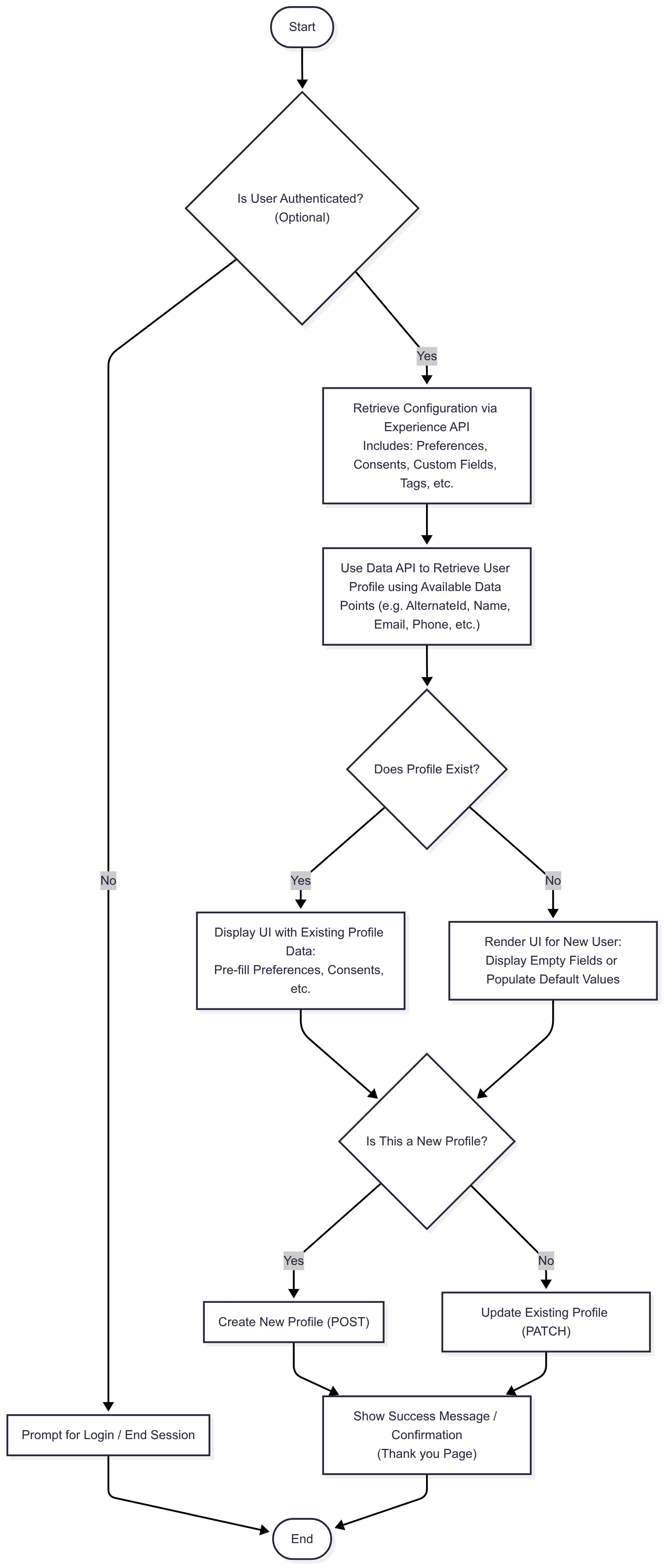
Once the required configuration data is returned, link it to the actual user by retrieving their profile. Use any known data point to look up the user, but for the most accurate match, it’s best to use the Profile ID or Alternate ID.
Creating a personalized and intuitive Preference Center is key to delivering a great user experience and ensuring compliance with evolving data privacy standards. Whether you're building a dedicated Preference Center or embedding feedback and consent collection within your app, Experience APIs play a central role in enabling flexibility, consistency, and accuracy.
Step 1: Design the Layout — Your UI, Your Way The visual layout and interaction model of your Preference Center is entirely customizable. Whether you're building a fully branded standalone preference center or embedding modular components within an app or website, you have complete creative freedom. The APIs provide the data and structure; the rest is up to your design vision and UX strategy.
Step 2: Displaying Preference Communications To display relevant preference communication options, you’ll want to tailor content based on what you know about the user.
Use the GET ProgramGroups by Custom Properties API to retrieve preference communications based on specific data points (e.g., user interests, region, or journey stage) you know about the individual. This allows you to surface only those categories of preference communications that are applicable to that individual, offering a more contextualized and relevant experience.
There are several APIs available that return preference communications, including their frequency and related attributes. You can choose the one that best fits your needs.
The Programs API return one or more programs whereas the Program Groups API returns a specific category of programs.
Step 3: Displaying Consents To display and manage user consents:
Use the GET Consents API to retrieve a list of all available consents configured in your system. Consents associated with the contact types are returned when you retrieve the relevant contact types.
Consents already associated with a user are automatically returned when you retrieve the user's profile.
This enables a clear view of which consents are required, optional, or already completed, empowering users to make informed choices.
Step 4: Display any additional data points
You can display any additional data points you wish to collect, such as Groups, Custom Fields, Tags, and more. These data points help you better understand your users and tailor communications based on their preferences.
Step 5: Merge Configuration Data with User Profile Once you've retrieved all configuration data (e.g., available consents, preferences, custom fields, etc.), you need to merge that with the individual’s profile data to create a personalized experience.
To retrieve the profile, use the GET Profile by ID endpoint or retrieve the profile using alternate identifiers such as an Alternate Id, email address, phone number, or any other known data point.
This step ensures that you're populating the UI with data that's both current and specific to the user, enabling real-time personalization. It also allows the user to correct the course by reviewing and reaffirming the consents, permissions, and preferences they've previously set, ensuring transparency and trust while keeping the experience aligned with their expectations.
By combining Experience APIs for front-end display and Data APIs for profile-level accuracy, you can build a Preference Center that is not only flexible and compliant but also engaging and user-first. This modular architecture enables you to scale and evolve your interface as your data strategy and user expectations grow.
Sample User Preference Center Flow – Profile Identification & UI Handling
Endpoints
Data API
The Data API's facilitate the display and collection of zero-party data for individual profiles across customer touchpoints. When driving customer experiences, they work seamlessly in conjunction with the Experience API to ensure that the relevant data points are accurately displayed on user interfaces, delivering highly personalized customer experiences.
Using the Data API's, you can use any data point on a profile to retrieve the profile. Please note that using contact elements, custom fields, groups, and tags to retrieve a profile may result in multiple matching profiles being returned.
A suite of historical API's are also available as part of this API library. You can retrieve the entire history for any data point associated with a user's profile, including standard fields, contact elements, custom fields, preferences, consents, and more.
Base URL
Production:
Sandbox:
Integration API
The Integration API suite includes asynchronous RESTful APIs for bulk import/export operations and Event APIs for retrieving event data, along with webhook subscriptions for real-time updates.
Bulk API
The MyPreferences 3.0 Bulk API is a powerful and efficient asynchronous RESTful API that serves as a robust conduit for seamless data transfer between MyPreferences and various external systems within your enterprise. It ensures that you can effortlessly manage and exchange large datasets, streamlining the process of integrating zero-party data across your technology ecosystem.
One of the primary advantages of the Bulk API lies in its ability to enable near-real time synchronization of customer data. This means that any updates or changes made within MyPreferences or other connected cloud-based or on-premise systems in your enterprise are swiftly propagated and reflected in the interconnected systems. As a result, your organization can maintain a consistent, up-to-date, and comprehensive view of customer data, which is essential for delivering relevant and compliant experiences.
Events API
Event APIs allow you to retrieve event data by account, subscription, profile, or specific event ID based on your webhook subscriptions. They facilitate experiences which enable customers to view their activity history, recent actions, and profile updates in real-time. By retrieving data based on webhook subscriptions, these APIs allow customers to track and review any changes or interactions they have made to their profiles, ensuring they have access to the most up-to-date information about their account activities.
Base URL
Production:
Sandbox:
User Management
The User Management API provides endpoints for creating, updating, and retrieving users. While users are typically created via the MyPreferences UI, these APIs provide a programmatic way to manage user accounts and facilitate system integrations that require direct user management.
On this page
- User Management